
Spreadsheet Size in Excel for Windows
2011-04-29
I've been thinking about converting my older XLS files to the newer XLSX format, but ran into a quirk that stopped me. Maybe I'm just too impatient. Here's my story.
A Few Facts First
Excel versions 97-2003 (Windows) have a file extension of XLS and the worksheet size is 65,536 rows and 256 columns. In Excel 2007 and 2010 the default file extension is XLSX and the worksheet size is 1,048,576 rows and 16,384 columns.
An XLSX File with Only 65,536 Rows
I open Excel 2003, create the following spreadsheet, and save the file. The formulas are listed in my last post.
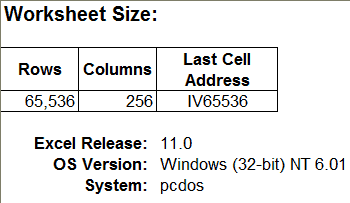
Next I open this file in Excel 2010, which now is in Compatibility Mode because it's an Excel 97-2003 Workbook (*.xls) file.

It still has only 65,536 rows and 256 columns, which is only natural because it's still in the older XLS file format.
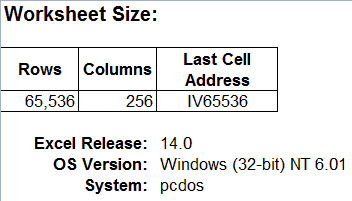
I save this file to the newer XLSX format.
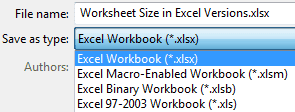
But this worksheet still has only 65,536 rows. I create a new worksheet in this XLSX file and it has only 65,536 rows.
Now I'm discouraged and stop trying to convert my old Excel files to the new file format. In fact, I tried several times over the past few years to do this file conversion, both in Excel 2007 and 2010, but had the same result each time.
The Quirk
What I didn't realize because of my impatience and inattention is that right after you save an XLS file to the newer XLSX format, Excel is still in Compatibility Mode, which is clearly labeled at the top of the Excel window.

Hence the smaller worksheet size.
After you save an XLS file to the newer XLSX format, just close and re-open the file to get rid of Compatibility Mode. Then all the worksheets have 1,048,576 rows and 16,384 columns.
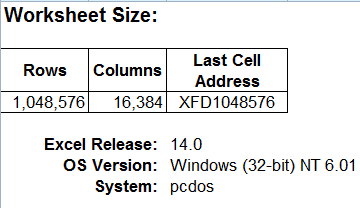
What is bizarre is the fact that I had to open an XLS file with Excel 2011 (Mac), to help me find quirk.