
Fill Down a Formula with VBA
2011-09-06
I commented on a post that brought to light, the fact that, using the cell fill-handle to "shoot" a formula down a column doesn't always work when the adjacent column(s) have blank cells. So I decided to share some Excel VBA code that's used to copy a formula down to the bottom of a column of data.
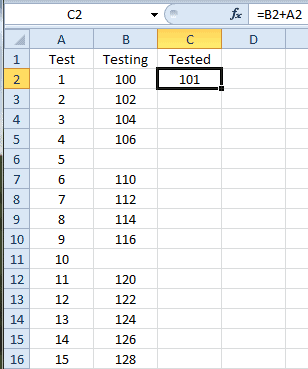
The situation is depicted below. Cell C2 is active, and has the formula =B2+A2. I want to copy it down to the rest of the column in this data range. However, cells B6 and B11 are empty, along with countless others below the visible table range. (Pretend this data table is huge.)
Here is some VBA code that will Fill Down the formula.
Sub FillDownFormula() ''''''''''''''''''''''''''''''''''''''''''''''''''''''''''''' ' Filldown a formula for in column of data. ' Assumes a data table with headings in the first row, ' the formula in the second row and is the active cell. ''''''''''''''''''''''''''''''''''''''''''''''''''''''''''''' Dim rng As Range Dim rngData As Range Dim rngFormula As Range Dim rowData As Long Dim colData As Long ' Set the ranges Set rng = ActiveCell Set rngData = rng.CurrentRegion ' Set the row and column variables rowData = rngData.CurrentRegion.Rows.Count colData = rng.Column ' Set the formula range and fill down the formula Set rngFormula = rngData.Offset(1, colData - 1).Resize(rowData - 1, 1) rngFormula.FillDown End Sub
The key is setting the formula range (rngFormula). I take the entire region of data (rngData) and offset by 1 row because I don't want the header row, then I resize the rows in the range by subtracting 1 from the total number of rows because I now need one less row in the range.
Next I offset the entire range by the row number of the active cell, but have to subtract one column because I offset from column 1, not column 0. And finally I resize the data range to 1 column, which gives me the single-column range I want with the formula in the top row.
The routine does no error checking and is restricted to using the active cell that has a formula. But it does the trick given those limitations.