
Extract Time from datetime with the MOD Function in Excel
2012-11-01
I had a reader comment on my last post about how to extract time from a date-time number using the MOD function. Simple really.
The syntax is MOD(number,divisor). The MOD function returns the remainder after number is divided by divisor. A simple example is MOD(5,2), which equals one (1). It works like this: five (5) divided by two (2) equals two (2), with one (1) left over.
All numbers are evenly divisible by one (1) so the MOD function returns any fractional part when the second argument is one (1).
In the screen shot below, cell C2 has the Date-Time number: 10/8/12 6:28 PM. It has an underlying serial number: 41990.7698, which you can see in cell C3 with General formatting.
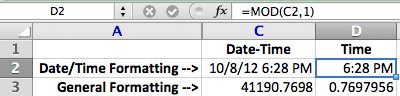
Using the formula =MOD(C2,1) you can see the result in cells D2 and D3, with different cell formatting. Extracting the Time value from a Date-Time value is simple with the MOD function.